


CleanMas
3.870.00 Reviews
App Specs
- Version
- V1.0.6
- Updated On
- License
- Free
- Downloads
- 5,000,000+
- Developer
- BetterFly Games
- Categories
- Tools
- Platform
- Android
Screenshots
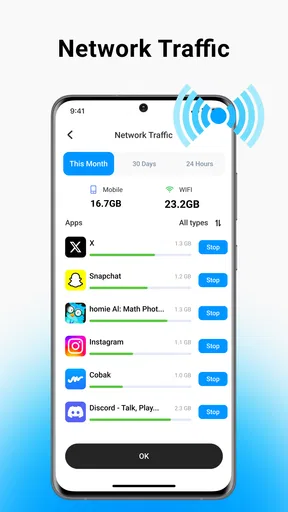
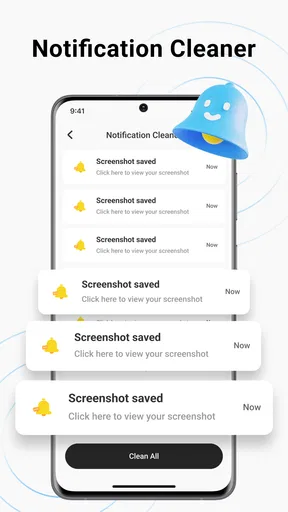
 Analysis by AppCompare
When a phone starts warning that storage is tight, the obvious temptation is to install a cleaner and hope one tap will sort everything out. I’d judge CleanMas by a more practical test: does it help me find pictures, videos, and other clutter I’m willing to remove, without making cleanup feel risky or turning it into another chore? That matters more than promises of a dramatic speed boost. I’d treat any cleaner as a tool for making informed choices, not as a substitute for checking what I’m about to delete.
Start with the storage problem you actually have
CleanMas is a free Android utility from BetterFly Games, aimed at people who want to tidy up junk files as well as photos and videos. It has a 3.9 average from around 2.7 thousand ratings, and more than a million installs. That gives a prospective user a sense of its reach, but I wouldn’t use popularity alone to decide whether it suits my phone. Its stated purpose is more useful as a guide: if your problem is a crowded media library or files you no longer need, it is at least pointed at the right kind of task.
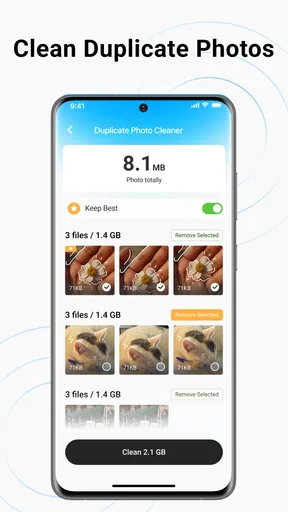
Before cleaning, I’d ask what is taking up space and what I can safely part with. A folder full of duplicate-looking pictures may contain near-identical shots that I still want to keep; an old video might be the only copy of a family moment. My rule is to review candidates in small batches, starting with items I can identify confidently. Keeping the final say over deletion is essential: freeing storage is only a win if I don’t lose something I meant to save.
A better fit for a quick, deliberate tidy-up
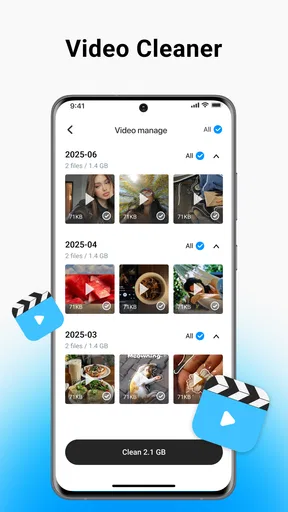
The clearest reason to choose CleanMas is convenience. Instead of opening several folders and hunting manually, I can use a cleanup-focused app as a place to begin reviewing unwanted media and junk. That is especially useful after a trip, a busy group chat, or a stretch of taking many similar photos. I would make a short session part of my routine rather than wait until the phone is nearly full, because a little sorting is easier than a panicked sweep through everything.
There is a useful distinction between finding clutter and deciding it is disposable. A cleanup tool can bring candidates to my attention, but I still need to check whether a picture is backed up, whether a video matters, and whether a file belongs to an app I rely on. I would also avoid treating a “junk” label as a guarantee that every suggested item is safe to erase. Reviewing the selection before confirming anything is a sensible habit, particularly when storage pressure makes it tempting to tap through quickly.
When the phone’s own tools may be enough
For a one-off cleanup, the storage controls already built into Android may be the better first stop. They keep the task close to the operating system and can be enough if I simply need to see what occupies space and remove a few files. A gallery app is often more comfortable when the real job is choosing between personal photos, because I can make those decisions in the context of the library I know. CleanMas makes more sense when I want a dedicated cleanup starting point, not when I expect it to replace careful photo management or routine file browsing.
I would skip a cleaner if I’m unwilling to inspect what it flags, if my storage issue comes from large apps I need to keep, or if I’m hoping an app can permanently solve a habit of saving everything. Removing media can create breathing room, but it does not change how quickly new downloads and recordings accumulate. In those cases, reviewing downloads, moving important files to a storage option I already trust, or uninstalling apps I no longer use may address the cause more directly. The best choice depends on whether I need help spotting expendable files or a different plan for managing storage.
Worth Reading Before You Choose

EA SPORTS FC Mobile 26 Is a Bigger Football Game, but It Takes Time

Flipboard Shows What News Apps Must Do Beyond the Feed

Switching to Android Auto Means Rethinking Your Driving Routine

Google Calendar Makes a Crowded Week Easier to Manage

Ludo King Makes the Most of the Minutes Between Plans

Baby Panda World Brings Quick Play to Modern Phones, but Its Game Library Feels Busy
Make cleanup fit your routine
A practical workflow is to begin with the easiest decisions: screenshots I no longer need, accidental captures, and clips I have already shared or saved elsewhere. Then I’d pause and look at anything that seems personal or difficult to replace. If I am cleaning before a long day out, I would rather remove a few obvious files in advance than delete a large, mixed batch while rushing to take a new photo. This kind of small, deliberate pass is less satisfying than a dramatic “one tap” promise, but it lowers the chance of regret.
It is also worth deciding what “enough space” means before opening a cleaner. If I only need room for a particular download or recording, I can stop once I have made that room rather than keep deleting just because more candidates remain. That limit helps avoid unnecessary cleanup and makes it easier to notice whether the real space hog is media, downloads, or an app. A tool is most useful when it supports a specific decision, not when it encourages endless optimization for its own sake.
A Fresh Start for Your Phone
From the moment I downloaded CleanMas, I was greeted with a sleek interface that made me feel like a digital Marie Kondo. The app’s layout is intuitive, with everything you need just a tap away. I didn’t have to dig through menus or scratch my head wondering where to start. It’s all about ease of use, and that’s a win in my book.
Once inside, you'll find a variety of tools designed to spruce up your phone in different ways. I particularly appreciated the junk cleaner feature. You know, those files and cache data that somehow accumulate like dust bunnies under your couch? Yeah, this feature zaps them away effortlessly. My phone felt noticeably faster after just one clean-up session!
Battery Saver: Because Who Likes a Dead Phone?
Now, let’s talk about battery life. I don’t know about you, but my phone always seems to run out of juice at the most inconvenient times. The battery saver tool in CleanMas helps manage background apps and processes that drain your battery. It’s like having a personal assistant ensuring your phone stays alive just a bit longer. I could actually make it through a full day without frantically searching for an outlet.
App Manager: Declutter Your Digital Life
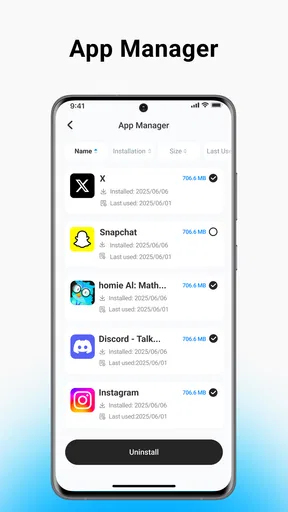
Another gem in the CleanMas toolkit is the app manager. If you’re anything like me, you download apps on a whim and forget about them until your storage is crying for help. This feature allows you to see which apps you haven’t used in forever and gives you a gentle nudge to consider deleting them. It’s all about making smarter choices with your storage space.
I also loved the fact that it categorizes apps by usage, so you can easily spot the ones that are hogging all your resources. It’s all done with just a few taps, making the whole process as painless as possible.
Privacy Protector: Keeping Your Data Safe
In today’s world, privacy is key. CleanMas offers a privacy protector feature that scans for potential vulnerabilities and suggests ways to bolster your phone’s defenses. It’s like having a digital bodyguard. Knowing that my data was more secure gave me peace of mind, especially with all the sensitive information we keep on our phones these days.
I found the suggestions practical and easy to implement, which is a big plus for those of us who aren’t tech wizards. It’s these little touches that make a big difference in how safe you feel using your device.
Final Thoughts: A Must-Have for Any Smartphone
Overall, CleanMas is a fantastic app for anyone looking to optimize their smartphone experience. It’s easy to use, packed with features, and most importantly, effective. Whether you’re looking to speed up your phone, save battery life, or simply keep things tidy, this app has got you covered.
CleanMas is listed for Everyone and supports Android 7.0 and later; its current release is V1.0.6. I’d still make the choice based on the job I need done, not on the breadth of the toolkit. A person who wants a straightforward place to begin sorting a messy phone may appreciate having cleanup, app management, and privacy suggestions together. Someone who only needs to remove a handful of old downloads may find the built-in file tools quicker, while a careful photo keeper may prefer to work directly in their familiar gallery.
One useful trade-off is that an all-in-one utility can make several maintenance tasks feel approachable, but that does not mean every tool should become part of a daily routine. I would use the media-cleanup side when I have a clear reason, then leave battery or privacy suggestions as prompts to review rather than instructions to accept automatically. That keeps the app in a supporting role and avoids changing settings or deleting items just to make a dashboard look cleaner.
So, if your phone is feeling a bit sluggish or cluttered, give CleanMas a try. It might just be the refreshment your device needs. And hey, who doesn’t love a clean phone?
Pros
- User-friendly interface for easy navigation.
- Efficient cleaning boosts device performance.
- Customizable cleaning options available.
- Lightweight
- won't drain your battery fast.
- Frequent updates for improved functionality.
Cons
- Occasional ads can be intrusive.
- Limited features in free version.
- May require permissions access.
- Some features need manual activation.
- Compatibility issues on older devices.
FAQs for CleanMas
What features does CleanMas offer to optimize my device?
CleanMas provides a comprehensive suite of features designed to enhance your device's performance. These include junk file removal, memory boosting, battery optimization, and app management. Additionally, it offers real-time protection against malware and privacy breaches, ensuring your device stays secure and runs efficiently.
Is CleanMas safe to use on my device?
Yes, CleanMas is designed with user safety in mind. It uses advanced security protocols to protect your data and privacy. The app undergoes regular updates to address any vulnerabilities, and it has a strong user rating on both Android and iOS platforms, indicating widespread trust among users.
How does CleanMas improve battery life?
CleanMas optimizes battery life by identifying and closing apps running unnecessarily in the background. It provides detailed insights into battery usage and offers tips for extending battery life. Additionally, its battery saver mode can be activated to automatically manage power consumption during low battery levels.
Does CleanMas require a subscription for full access?
CleanMas offers both free and premium versions. The free version includes basic features such as junk file cleaning and memory boosting. The premium subscription unlocks advanced features like deep cleaning, real-time malware protection, and priority support, providing a more comprehensive cleaning experience.
Can CleanMas help with managing app storage?
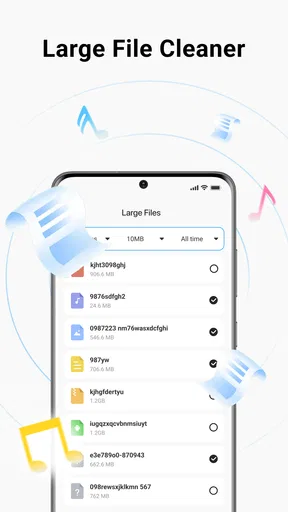
Absolutely. CleanMas includes an app management tool that allows you to view and control app storage usage. It identifies large files and rarely used apps, giving you the option to delete or offload them. This helps in freeing up valuable storage space and improving overall device performance.


